UAI High-Level Design (HLD)
The system shape, control-plane services, interaction lifecycle, trust model, and the architectural decisions behind them.
Scope of this page. This page covers the High-Level Design only: the system shape, the control-plane services, the interaction lifecycle, the trust model, and the architectural decisions behind them. Low-level designs (LLDs), API field-level schemas, database designs, and per-service implementation breakdowns live in a separate page. Where this page says what a component does, the matching how belongs in the LLD page.
Authoritative source. The UAI Technical Specifications and Execution Blueprint remain the normative source for the protocol. This page is the engineering HLD built on top of them.
1. Overview
UAI (Unified AI Interface) is a notary-model trust layer for AI agents. It confirms who may do what between two agents and records a tamper-evident, hash-only receipt of each interaction. The actual data flows directly between the two agents, peer-to-peer over TLS 1.3, and never passes through UAI.
The platform is built in Go as a set of microservices. Phase 1 delivers a working lifecycle (discover, then authorise, then execute peer-to-peer, then receipt) against a stable control plane.
2. Architecture at a glance
%%{init: {
  "theme": "base",
  "themeVariables": {
    "background": "transparent",
    "fontFamily": "Inter, Segoe UI, Helvetica, Arial, sans-serif",
    "textColor": "#1a2330",
    "titleColor": "#1a2330",
    "nodeTextColor": "#1a2330",
    "lineColor": "#5b6472",
    "primaryColor": "#eef4fb",
    "primaryTextColor": "#10324f",
    "primaryBorderColor": "#185fa5",
    "clusterBkg": "#f4f7fb",
    "clusterBorder": "#7f93ac",
    "edgeLabelBackground": "transparent"
  },
  "flowchart": { "curve": "basis", "nodeSpacing": 30, "rankSpacing": 50, "htmlLabels": true }
}}%%
flowchart TB
  subgraph DP["DATA PLANE · peer-to-peer · TLS 1.3 · UAI never sees the payload"]
    direction LR
    SEEKER["Seeker Agent<br/>discover · request token<br/>call provider · verify receipt"]
    PROVIDER["Provider Agent<br/>validate token offline · serve data<br/>sign UAIReceipt (Ed25519)"]
    SEEKER ==>|"4 · open TLS 1.3 → 6 · P2P query · Bearer JWT<br/>payload lives ONLY on this link · never in the control plane"| PROVIDER
    SEEKER -.->|"2 · verify provider DID (offline)"| PROVIDER
  end
  subgraph CP["UAI CONTROL PLANE · token metadata and receipt hashes only · no payload custody"]
    direction LR
    subgraph REG["Registry · :8000"]
      direction TB
      R1["HTTP API · challenge + nonce<br/>proof-of-control (Ed25519)"]
      R2["Discovery · capability / scope<br/>tier / residency · cursor pagination"]
    end
    REGDB[("Postgres · agents (GIN/FTS)<br/>Redis · nonces, cache")]
    subgraph TS["Trust Server · :8002 · stateless"]
      direction TB
      T1["Token API · policy evaluator<br/>consent validator (T2+) · DPoP (T3, deferred)"]
      T2["Key ring (Ed25519, 3-key FIFO)<br/>JWT minter · EdDSA"]
    end
    TSDID["well-known/did.json<br/>active keys · rotation-safe"]
    subgraph AUD["Audit Ledger · :8001"]
      direction TB
      A1["Receipt API · POST async 202<br/>schema: sha256 · jcs:rfc8785 · 3 DIDs"]
      A2["Append-only triggers<br/>participant-only query (403, no leak)"]
    end
    AUDDB[("Postgres · append-only<br/>180-day · AES-256-GCM")]
    REG --- REGDB
    AUD --- AUDDB
    TS --- TSDID
    TS -->|"3a · provider / scope check<br/>REST · pkg/clients"| REG
  end
  subgraph SF["SHARED FOUNDATION · pkg/ · compiled into every binary from one source"]
    direction LR
    P1["jcs · RFC 8785"]
    P2["ed25519x"]
    P3["did · did:web"]
    P4["jwtmint · jwtverify"]
    P5["schema"]
    P6["clients · only cross-service path"]
  end
  SEEKER -->|"1 · discover"| REG
  SEEKER -->|"3 · get token"| TS
  PROVIDER -.->|"5 · validate token offline (ZTAA)"| TSDID
  PROVIDER -->|"7 · submit receipt (202)"| AUD
  REG -.-> SF
  TS -.-> SF
  AUD -.-> SF
  classDef reg fill:#e6f1fb,stroke:#185fa5,color:#10324f;
  classDef trust fill:#efeefb,stroke:#534ab7,color:#241f57;
  classDef audit fill:#e1f5ee,stroke:#0f6e56,color:#0a3d30;
  classDef store fill:#eceff3,stroke:#6b7480,color:#222;
  classDef shared fill:#ffffff,stroke:#777,color:#222;
  class SEEKER,R1,R2 reg;
  class T1,T2,TSDID trust;
  class PROVIDER,A1,A2 audit;
  class REGDB,AUDDB store;
  class P1,P2,P3,P4,P5,P6 shared;
  style DP fill:#fbfcfd,stroke:#9aa3b0,stroke-dasharray:6 4,color:#3a424d;
  style CP fill:#f4f7fb,stroke:#185fa5,stroke-dasharray:6 4,color:#10324f;
  style SF fill:#f4f4f5,stroke:#777,color:#333;
  style REG fill:#eef4fb,stroke:#185fa5,stroke-width:2px;
  style TS fill:#efeefb,stroke:#534ab7,stroke-width:2px;
  style AUD fill:#e7f5ef,stroke:#0f6e56,stroke-width:2px;
  linkStyle 0 stroke:#0f6e56,stroke-width:3.5px;
  linkStyle 1 stroke:#6b7480,stroke-width:1.6px;
  linkStyle 2,3,4 stroke:#9aa3b0,stroke-width:1.2px;
  linkStyle 5 stroke:#d35400,stroke-width:2.5px;
  linkStyle 6,7 stroke:#333,stroke-width:2px;
  linkStyle 8 stroke:#6b7480,stroke-width:1.6px;
  linkStyle 9 stroke:#333,stroke-width:2px;
  linkStyle 10,11,12 stroke:#b6bcc4,stroke-width:1px;
SVG for better visualization
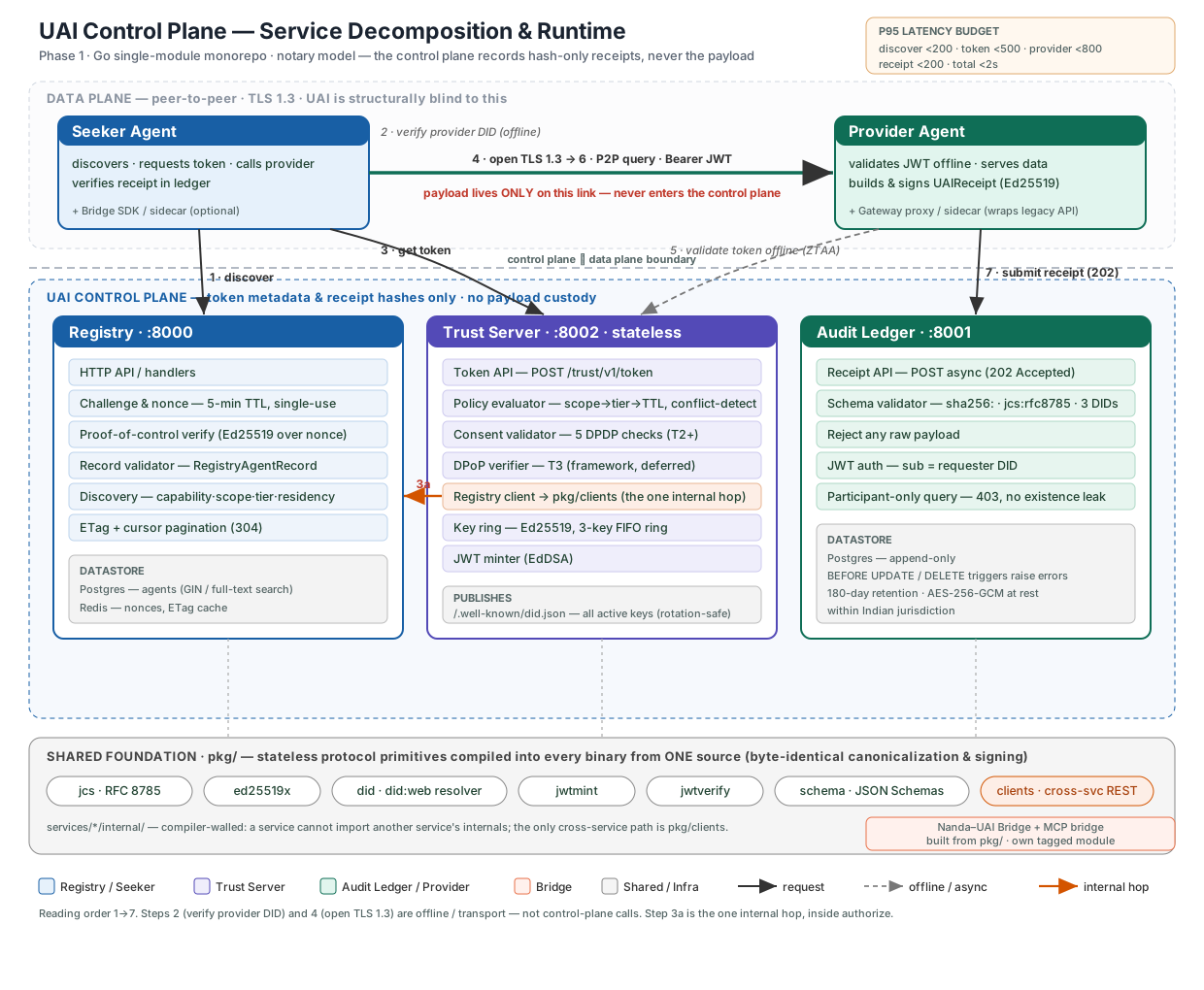
3. Component descriptions
Registry
- Challenge & nonce — 5-min TTL, single-use: This is used for verifying seeker. When an agent shows up to register, the Registry hands it a random one-time string (the “nonce”) and says “sign this.” It expires in 5 minutes and works only once, so no one can copy it and reuse it later.
- Proof-of-control verify (Ed25519 over nonce) — The agent signs that random string with its private key and sends it back. The Registry checks the signature against the agent’s public key (Ed25519 is just the signing method used). If it matches, the agent has proven it really holds the private key behind its identity — so it can’t register pretending to be someone else.
- Discovery — capability·scope·tier·residency — This is the search. A Seeker asks “find me a provider that can do X,” and the Registry filters by four things: capability (what the provider can actually do), scope (what kind of data or action), tier (how risky it is), and residency (where the data physically lives, e.g. inside India). It returns the providers that match.
- Cursor pagination — Serves results in stable pages anchored to a fixed sort key, so the list stays consistent even as agents register and deregister.
Trust server - decision pipeline + signing machinery
- Token API — A Seeker calls this one endpoint asking “may I do X with Provider Y?” and gets back a signed delegation token. Everything else below is a step that runs behind this door before the delegation token is handed over.
- Policy evaluator — scope → tier → TTL — Takes the action being requested (the “scope,” e.g. read basic profile vs read bank statements) and looks it up in a risk policy to decide two things: how risky it is (the tier, 1–4) and how long the permission should last (TTL, time-to-live). Riskier action → higher tier → shorter-lived token and more checks. Example: a low-risk public lookup might be Tier 1, valid ~5 minutes; pulling personal financial data might be Tier 3, valid only ~60 seconds.
- Consent validator — 5 DPDP checks (Tier 2+) — For anything Tier 2 and up (i.e. touching personal data), India’s DPDP law says the user must have agreed. So before issuing a token, the Trust Server fetches the user’s consent artifact (a signed “I allow this” record) and runs five checks: is it still valid (not expired), not revoked, does it cover this exact scope, does it name this seeker and this provider, and are the required consent flags all true. All five must pass.
- DPoP verifier — Tier 3 — An anti-theft measure for the highest tier. A normal token is “bearer” — whoever holds it can use it, like cash. DPoP binds the token to the caller’s specific key, so even a stolen token is useless without the matching private key.
- Key ring — Ed25519, 3-key FIFO — The Trust Server signs tokens with a private key, and for security those keys get rotated periodically. Problem: a token signed 30 seconds before a rotation still has to be verifiable afterward. So the key ring keeps the last few keys (3, dropping the oldest when a new one arrives — first-in-first-out).
- JWT minter (EdDSA) — The part that actually builds and signs the token. It packs the claims (transaction ID, scope, tier, expiry, who it’s for) into a JWT — a standard, compact token format — and signs it with the current key using EdDSA (the signing algorithm). The signature is what makes it tamper-proof: change any field and the signature breaks.
- Publishes
/.well-known/did.json— The Trust Server posts its public keys at a fixed, predictable URL. Here’s why it matters: when a Provider receives a token, it needs the Trust Server’s public key to check the signature. By publishing keys at a known address, a Provider can fetch them once, cache them, and then verify every token completely offline.
Audit Ledger - write and read paths
- Receipt API — (async, 202) — The front door for writing a record. After a Seeker and Provider finish an interaction, the Provider sends in a receipt — a small “this happened” record. The Ledger replies
202 Acceptedimmediately. - Receipt schema validator —
sha256·jcs:rfc8785· 3 DIDs — Before storing anything, it checks the receipt is well-formed and, crucially, contains no actual data — only fingerprints of it. Three things it enforces: the content is represented as sha256 hashes (one-way fingerprints, not the data itself), the hashing was done over canonicalized JSON (jcs:rfc8785— a single exact byte-form, so the same data always produces the same fingerprint), and the receipt names all three DIDs (the Seeker, the Provider, and the Trust Server that authorized it). - Reject any raw payload — The flip side of the validator, called out because it’s the whole point: if a receipt tries to smuggle in real content instead of a hash, it’s refused.
- JWT auth —
sub= requester DID — Now the read path. Reading receipts is sensitive, so anyone asking to read must prove who they are with a token whosesub(subject) field states their DID. The Ledger trusts the request only as far as that verified identity. - Participant-only query — 403, no existence leak — The access rule: you may read a receipt only if you were one of its participants (the Seeker or the Provider on that transaction). Everyone else is refused.
- Append-only storage —
BEFORE UPDATE/BEFORE DELETEtriggers — The foundation under all of it. Receipts can only ever be added, never changed or removed. This is enforced at the database itself: triggers fire before any update or delete and reject it outright — so even a developer with database access, or a buggy bit of code, physically cannot alter history. That immutability is what gives a receipt evidentiary weight: if it’s in the Ledger, it hasn’t been touched since it was written. (Sitting alongside this: 180-day retention, encrypted at rest, kept within Indian jurisdiction.)